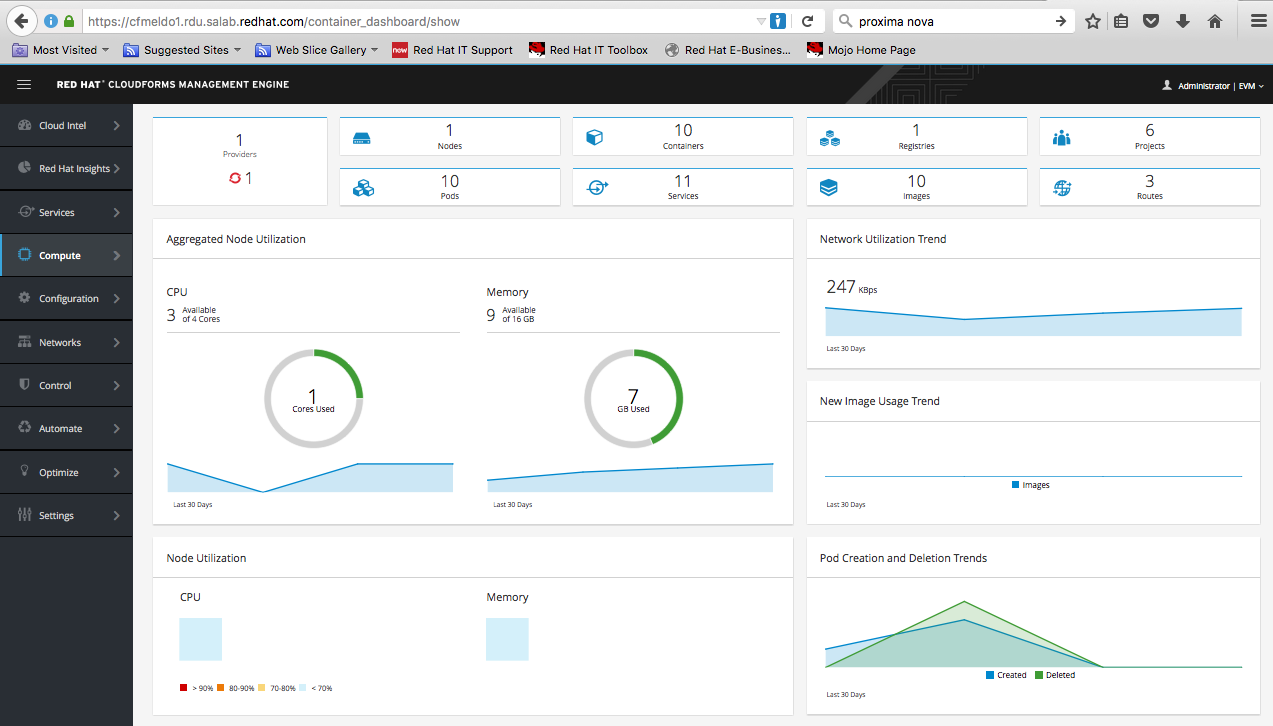
If you were wondering how CloudForms 4.0 and OpenShift 3.1 work together then you are at the right place. This post is about the integration of CloudForms 4.0 and OpenShift 3.1. I will describe how-to install OSE 3.1 and how-to configure it so that you can connect CloudForms with OpenShift 3.1. My steps here are for a small POC and by no means production. The goal is that CloudForms will discover the OpenShift environment and collect metrics of the containers as well as package information through smart state analysis/introspection. For introspection to work properly you CloudForms appliance needs to have the smart-proxy role enabled.
I wrote 2 scripts which do the whole work for you. If everything works fine you should be able to do the same as I show in the following video
If you don’t wont to do this step by step here is the github repo to it.
https://github.com/ldomb/buildoseforcfme
Step 1. This will prepare the master and nodes for the ose install.
[root@masterallinone ~]# cat > /root/prepforeose.sh <<EOFPREP
MASTERFQDN=master.local.domb.com
#NODE1FQDN=node1.local.domb.com
#NODE2FQDN=node2.local.domb.com
#NODE3FQDN=node3.local.domb.com
RHNUSER=youruser
RHNPASSWORD=yourpass
POOLID=yourpool

echo "Registering System"
subscription-manager register --username=$RHNUSER --password=$RHNPASSWORD
subscription-manager attach --pool=$POOLID

echo "enabling all the repos"
subscription-manager repos --disable="*"
subscription-manager repos \
    --enable="rhel-7-server-rpms" \
    --enable="rhel-7-server-extras-rpms" \
    --enable="rhel-7-server-ose-3.2-rpms"

yum -y install wget git net-tools bind-utils iptables-services bridge-utils bash-completion httpd-tools

yum update -y
### Install utilites for quick and advanced installation"
yum -y install atomic-openshift-utils

yum install -y docker-1.10.3
mkdir /images
chmod a+rwx /images

sed -i 's|--selinux-enabled|--insecure-registry=172.30.0.0/16 --selinux-enabled|g' /etc/sysconfig/docker

if [ "`hostname -f`" == "$MASTERFQDN" ];
then
ssh-keygen
  if [ -n "${MASTERFQDN}" ]; then
    echo "Copying keys to $MASTERFQDN"
    ssh-keygen
    ssh-copy-id root@$MASTERFQDN
  fi

  if [ -n "${NODE1FQDN}" ]; then
    echo "Copying keys to $NODE1FQDN"
    ssh-copy-id root@$NODE1FQDN
    scp /root/prepforeose.sh root@$NODE1FQDN:
    ssh root@$NODE1FQDN "chmod +x /root/prepforeose.sh && ./prepforeose.sh"
    ssh root@$NODE1FQDN "init 6"
  fi

  if [ -n "${NODE2FQDN}" ]; then
    echo "Copying keys to $NODE2FQDN"
    ssh-copy-id root@$NODE2FQDN
    scp /root/prepforeose.sh root@$NODE2FQDN:
    ssh root@$NODE2FQDN "chmod +x /root/prepforeose.sh && ./prepforeose.sh"
    ssh root@$NODE2FQDN "init 6"
  fi

  if [ -n "${NODE3FQDN}" ]; then
    echo "Copying keys to $NODE3FQDN"
    ssh-copy-id root@$NODE3FQDN
    scp /root/prepforeose.sh root@$NODE3FQDN:
    ssh root@$NODE3FQDN "chmod +x /root/prepforeose.sh && ./prepforeose.sh"
    ssh root@$NODE3FQDN "init 6"
  fi
fi

echo "reboot master manually"
EOFPREP
Step 2. Execute prepforeose.sh. You will have to enter the root password during ssh-copy-id.
[root@masterallinone ~]# chmod +x /root/prepforeose.sh && /root/prepforeose.sh
Step 3. The buildoseforcfme.sh script runs ansible to install OSE v3 and creates all the user/service accounts so that you can connect to OpenShift from CloudForms.
[root@masterallinone ~]# cat > /root/buildoseforcfme.sh <<EOFOSE
#!/bin/bash
# Create an OSEv3 group that contains the masters and nodes groups

MASTERFQDN='master.local.domb.com'
#NODE1FQDN='node1.local.domb.com'
#NODE2FQDN='node2.local.domb.com'
#NODE3FQDN='node3.local.domb.com'
SUBDOMAIN='apps.local.domb.com'
HAWKULARFQDN=$MASTERFQDN
USER1=admin
USER2=''
######################################################################

cd ~

echo "Writing Ansible HOSTS File"
cat <<EOF | tee /etc/ansible/hosts
[OSEv3:children]
masters
nodes

# Set variables common for all OSEv3 hosts
[OSEv3:vars]
# SSH user, this user should allow ssh based auth without requiring a password
ansible_ssh_user=root
osm_default_subdomain=$SUBDOMAIN

# If ansible_ssh_user is not root, ansible_sudo must be set to true
#ansible_sudo=true

deployment_type=openshift-enterprise

# uncomment the following to enable htpasswd authentication; defaults to DenyAllPasswordIdentityProvider
openshift_master_identity_providers=[{'name': 'htpasswd_auth', 'login': 'true', 'challenge': 'true', 'kind': 'HTPasswdPasswordIdentityProvider', 'filename': '/etc/origin/htpasswd'}]

# host group for masters
[masters]
$MASTERFQDN

# host group for nodes, includes region info
[nodes]
$MASTERFQDN openshift_node_labels="{'region': 'infra', 'zone': 'default'}"
#$NODE1FQDN openshift_node_labels="{'region': 'primary', 'zone': 'default'}"
#$NODE2FQDN openshift_node_labels="{'region': 'primary', 'zone': 'default'}"
#$NODE3FQDN openshift_node_labels="{'region': 'infra', 'zone': 'default'}"
EOF

echo "Running Asible"
ansible-playbook /usr/share/ansible/openshift-ansible/playbooks/byo/config.yml

echo "making master node schedulable"
oadm manage-node $MASTERFQDN --schedulable=true


if [ -n "${USER1}" ]; then
    echo "Creating user $USER1"
    htpasswd /etc/origin/htpasswd $USER1
    oadm policy add-cluster-role-to-user cluster-admin $USER1
fi

if [ -n "${USER2}" ]; then
    echo "Creating user $USER2"
    htpasswd /etc/origin/htpasswd $USER2
fi

echo "login as admin"
oc login -u system:admin

###### Obsolete in OSE 3.2 is created by ansible #######
echo "creating registery"
#oadm registry --service-account=registry --config=/etc/origin/master/admin.kubeconfig --credentials=/etc/origin/master/openshift-registry.kubeconfig --images='registry.access.redhat.com/openshift3/ose-${component}:${version}' --mount-host=/images
echo "creating cert"
CA=/etc/origin/master
oadm ca create-server-cert --signer-cert=$CA/ca.crt --signer-key=$CA/ca.key --signer-serial=$CA/ca.serial.txt --hostnames='*.$SUBDOMAIN' --cert=cloudapps.crt --key=cloudapps.key
cat cloudapps.crt cloudapps.key $CA/ca.crt > cloudapps.router.pem

echo "Adding router"
#oadm router --default-cert=cloudapps.router.pem --credentials='/etc/origin/master/openshift-router.kubeconfig' --selector='region=infra' --images='registry.access.redhat.com/openshift3/ose-${component}:${version}' --service-account router
####################################

oc project management-infra
oadm policy add-role-to-user -n management-infra admin -z management-admin
oadm policy add-role-to-user -n management-infra management-infra-admin -z management-admin
oadm policy add-cluster-role-to-user cluster-reader system:serviceaccount:management-infra:management-admin
oadm policy add-scc-to-user privileged system:serviceaccount:management-infra:management-admin
oc sa get-token -n management-infra management-admin > /root/cfme4token.txt

echo "Createing Metrics"
oc project openshift-infra
oc create -f - <<API
apiVersion: v1
kind: ServiceAccount
metadata:
  name: metrics-deployer
secrets:
- name: metrics-deployer
API

oadm policy add-role-to-user \
    edit system:serviceaccount:openshift-infra:metrics-deployer

oadm policy add-cluster-role-to-user \
    cluster-reader system:serviceaccount:openshift-infra:heapster

oc secrets new metrics-deployer nothing=/dev/null
cp /usr/share/openshift/examples/infrastructure-templates/enterprise/metrics-deployer.yaml metrics-deployer.yaml
oc new-app -f metrics-deployer.yaml \
    -p HAWKULAR_METRICS_HOSTNAME=hawkular-metrics.$SUBDOMAIN \
    -p USE_PERSISTENT_STORAGE=false
    -p METRIC_DURATION=7


############## Not needed for CF 4.1 and OSE 3.2 ######################################################
echo "creating router for managmeent metrics"
#### This router must, at the moment, run on the master nodes to expose the metrics on the port 5000 to CloudForms Management Engine, hence the need for a selector on the kubernetes.io/hostname of the master node. ####

oadm router management-metrics -n default --credentials=/etc/origin/master/openshift-router.kubeconfig --service-account=router --ports='443:5000' --selector="kubernetes.io/hostname=$MASTERFQDN" --stats-port=1937 --host-network=false

#######################################################################################################

echo "MAUNUAL SETPS"
echo "add line to /etc/origin/master/master-config.yaml"
echo "assetConfig:"
echo "metricsPublicURL: https://$MASTERFQDN/hawkular/metrics"
EOFOSE
Step 4. Execute the buildoseforcfme.sh script. Make sure to visit the hawkular URL in the browser and accept the cert for https://$HAWKULARFQDN/hawkular/metrics and https://$HAWKULARFQDN:5000 . After the install you will find the needed token for CloudForms in /root/cfme4token.txt. You can add it to your CloudForms OpenShift Provider.
[root@masterallinone ~]# chmod +x /root/buildoseforcfme.sh && /root/buildoseforcfme.sh
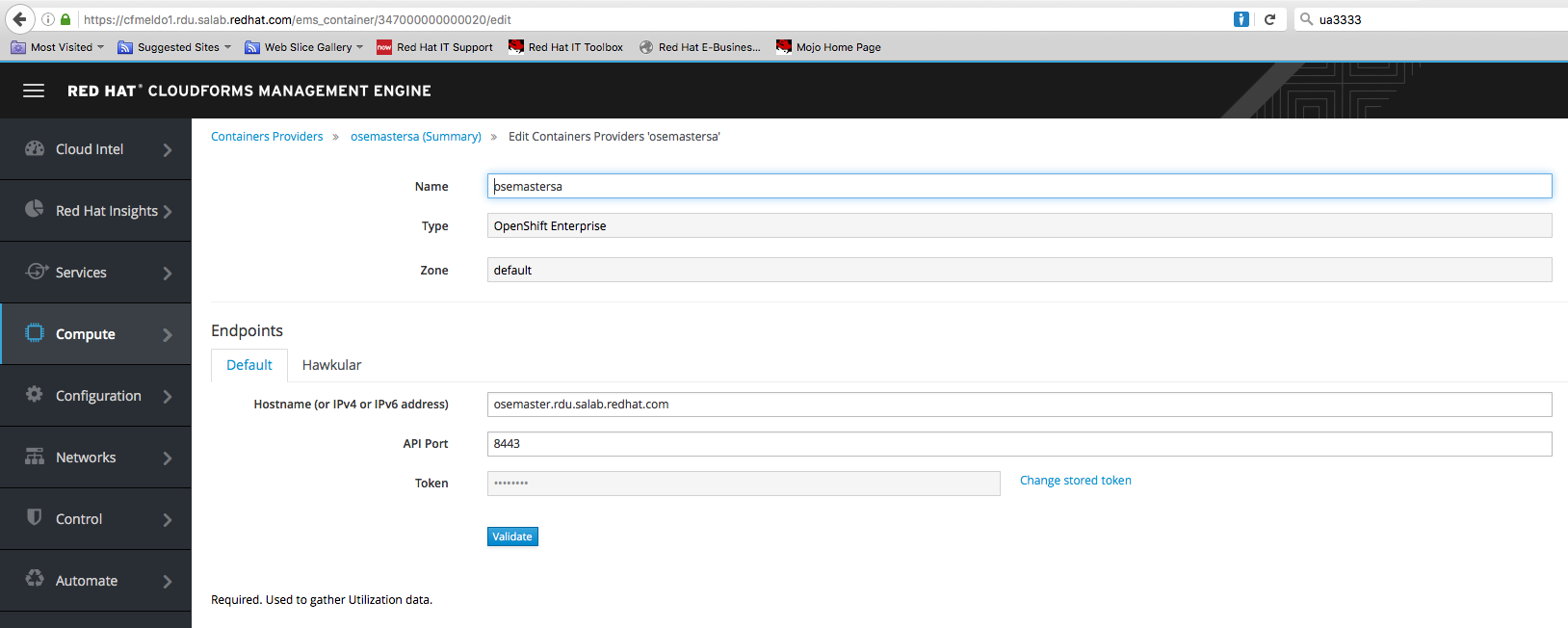
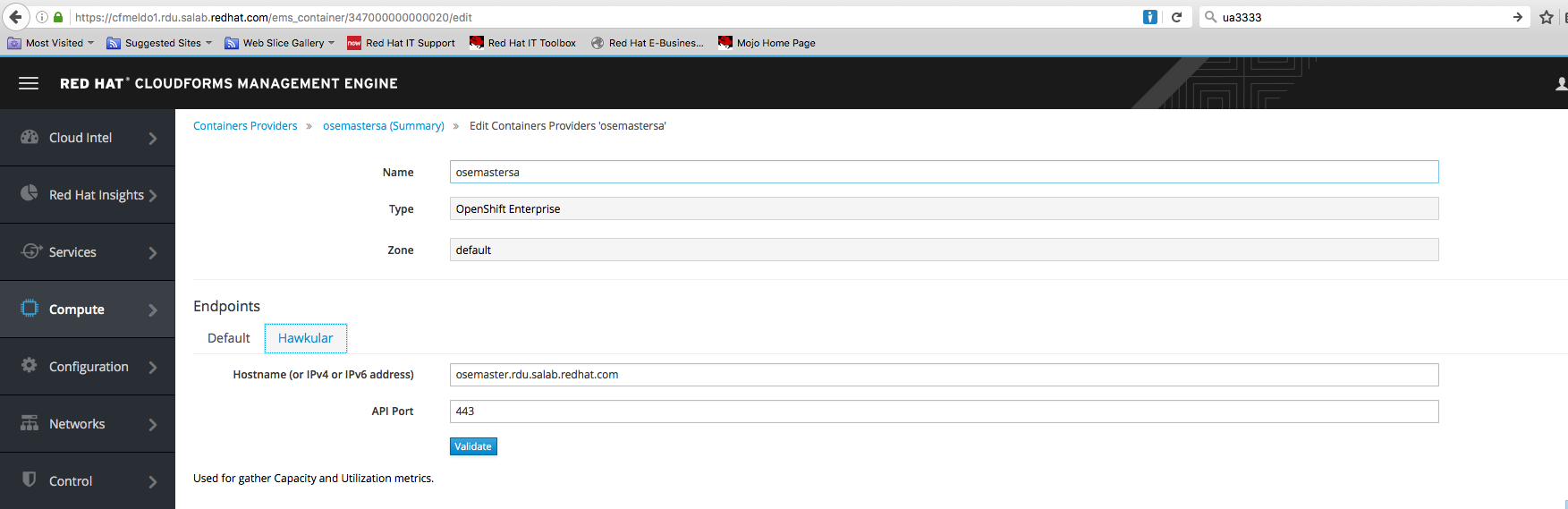
Step 5. For Hawkular add the hawkular URL. If this is not your master like in this example you will have to point to the node where hawkular is running or in a HA setup to the load balancer which forwards the port 443.
Step 6. In CloudForms make sure that all the metrics collection check-boxes are enabled under Configure->Configuration->Server-Server Control.